 HappyMod Extra
Download VN - Video Editor & Maker Mod APK v2.9.7 [Unlocked] - A Quick and Pro Video Editor.
VN - Video Editor & Maker
v2.9.7
Dec 5, 2025
Ubiquiti Labs Llc
5.0 and up
301.19 MB

Free
Mod info
Full Unlocked
Premium Unlocked
No Ads
Mod Menu
What is VN - Video Editor & Maker
VN - Video Editor & Maker is a versatile mobile application designed for both amateur and professional video creators. With its user-friendly interface and powerful editing tools, VN enables users to produce high-quality videos directly from their smartphones. The app supports multi-layer editing, allowing users to create complex video compositions effortlessly. Users can add various elements including music, sound effects, transitions, and text overlays to enhance their videos. VN offers a rich library of templates and themes, making it easy for users to start their projects without needing advanced editing skills. One of the standout features of VN is its support for 4K video resolution, ensuring that videos maintain high quality regardless of the device used for viewing.
VN also brings advanced editing features such as speed control, green screen effects, and multi-track audio editing, which allow users to manipulate their clips creatively. Additionally, the app includes robust color grading tools, enabling users to adjust saturation, contrast, and brightness to achieve their desired visual style.
Incorporating a variety of video formats, VN caters to the needs of social media enthusiasts, allowing quick exports suitable for platforms like Instagram, TikTok, and YouTube. Users can personalize their projects with a range of fonts and styles, giving each video a unique touch. VN supports collaboration, allowing multiple users to work on the same project, which is ideal for team projects or content creation in groups. Moreover, VN operates without the need for a subscription, making it a cost-effective solution for those seeking quality video editing software.
Overall, VN - Video Editor & Maker stands out as an innovative video editing app that combines simplicity with powerful features, making it accessible for all levels of content creators aiming to bring their vision to life.
Key feature of VN - Video Editor & Maker
User-Friendly Interface
VN - Video Editor & Maker boasts an intuitive interface designed for both amateur and professional editors. The app's layout simplifies the editing process, allowing users to easily navigate through various tools and features without the need for extensive prior experience. This accessibility ensures that anyone can jump in and start creating high-quality videos swiftly.
- Intuitive Controls: The app’s layout is designed to make finding tools and features straightforward, catering to both beginners and seasoned editors.
- No Watermark: VN provides a free editing experience without the burden of watermarks, allowing users to share their content freely.
- Multi-Track Timeline: The user can utilize a multi-track timeline, enabling the addition of various media layers such as video clips, audio tracks, and effects.
Advanced Editing Tools
The app offers an array of advanced editing tools, including keyframe animation, speed adjustments, and reverse effects. These features provide users with professional-grade capabilities, helping them create dynamic and engaging video content. The built-in tools allow for intricate edits that can make videos stand out.
- Keyframe Animation: Users can create custom animations by adjusting keyframes, which enhances the storytelling aspect of their videos.
- Speed Curves: VN includes speed curve options, letting editors adjust playback speeds smoothly, akin to advanced software like Adobe Premiere Pro.
- Freeze Frame: A freeze frame option allows users to pause and highlight a specific moment in their video.
Flexible Audio Options
VN provides flexible audio editing options, including voice-over features and music synchronization capabilities. Users can easily layer audio to enhance their videos, adding a personal touch that makes their content more lively and engaging.
- High-Quality Voice-Overs: The app enables users to record high-quality voice-overs, allowing for clearer narratives in videos.
- Music Beats Editing: Users can add markers to align video edits with the rhythm of the music, creating a synchronous and polished visual experience.
- Diverse Sound Catalog: VN includes a broad selection of sounds and music tracks that users can incorporate into their projects.
Rich Effects Library
VN offers a rich library of effects and transitions that help enhance video content. From cinematic filters to dynamic transitions, users have a plethora of choices to elevate their videos. These effects can make even simple edits appear professional and visually appealing.
- Cinematic Filters: Users can import LUT files to apply stunning cinematic effects to their videos.
- Dynamic Transitions: A variety of transitions are available that can seamlessly connect scenes, adding flair to video storytelling.
- Customizable Effects: Users have the ability to adjust the timing and speed of effects and transitions to suit their editing style.
Seamless Collaboration
VN facilitates seamless collaboration between mobile and desktop devices, allowing users to transfer projects effortlessly. This feature is especially valuable for creators who work across multiple platforms, ensuring a consistent workflow regardless of the device used.
- Cloud Storage Integration: Users can save, edit, and retrieve their projects via Google Drive or OneDrive, making editing on-the-go possible.
- Draft Preservation: VN allows users to save drafts and resume working at any time without losing progress.
- Collaborative Editing: Team members can easily share drafts and templates, fostering collaborative video projects.
Custom Export Settings
The app offers customizable export settings, permitting users to tailor video resolution, frame rate, and more to suit their needs. This feature is key for creators who require specific output formats for different platforms, ensuring the best presentation possible.
- 4K Export Capabilities: VN allows users to export videos in stunning 4K quality, catering to professional standards.
- Adjustable Frame Rates: Users can modify frame rates up to 60 FPS, providing flexibility for action-oriented videos or cinematic looks.
- Various Bitrate Options: The app provides different bitrate settings to balance video quality and file size according to user requirements.
Pros and Cons of VN - Video Editor & Maker
Pros:
- User-friendly interface
- Wide range of features
- High-quality output
- Supports multiple formats
Cons:
- Limited advanced editing
- Watermark on free version
- Can be resource-intensive
- Ads in free version
How to use VN - Video Editor & Maker app
- **Download and Install**: Start by downloading the VN app from the App Store or Google Play and install it on your device.
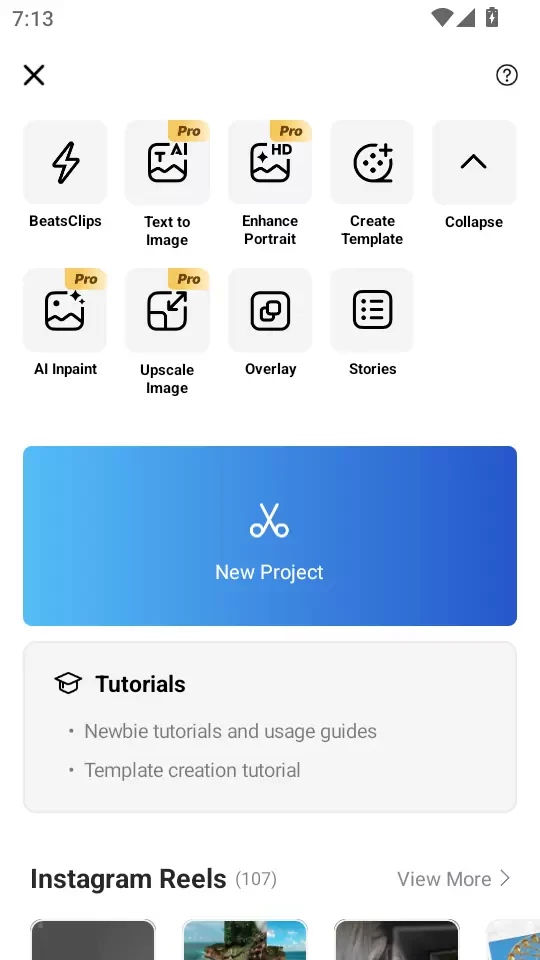
- **Create a New Project**: Open the app and tap on the '+' icon to start a new project. You can choose to import media from your gallery.
- **Import Media**: Select videos, photos, or audio files you want to use in your project.
- **Editing Tools**: Utilize various editing features such as trimming clips, splitting videos, adding text, filters, and transitions. Tap on a clip to access the editing tools.
- **Add Music**: You can add background music by tapping the audio icon and selecting tracks from your library or the app’s collection.
- **Export Your Video**: Once you're satisfied with your edits, tap the export button to save your video to your device or share it directly on social media platforms.
- **Explore Features**: Experiment with advanced features like multi-layer editing, keyframe animations, and speed adjustments for more creative control.
VN - Video Editor & Maker FAQs
How do I add music to my video in VN?
To add music, open your project, tap on the 'Audio' tab, then select 'Music'. You can choose from provided tracks or import your own music file. Adjust the volume as needed.
Can I create slow-motion or fast-motion effects in VN?
Yes, you can create slow-motion and fast-motion effects. Select the clip, click on 'Speed', and adjust the slider to speed up or slow down the video according to your requirements.
How do I split a video clip in VN?
To split a video clip, select the clip on your timeline, move the playhead to the position where you want to split, and then tap on the 'Scissors' icon. The clip will be divided into two.
What is the process to add text to my video?
You can add text by following these steps:
Select your video clip on the timeline.
Tap the 'Text' option.
Choose a text style and enter your desired text.
Adjust the position and duration.
How can I export my video project?
To export your project, tap 'Export' in the main menu, select your desired resolution and frame rate, then click 'Export' again. The video will be processed and saved to your device.