 HappyMod Extra
Download Clone App-Parallel Dual Space Mod APK v4.0.7 [Unlocked] - Hide apps/photos/videos, app lock & video downloader in Private Space.
Clone App-Parallel Dual Space
v4.0.7
Dec 4, 2025
Shenzhen Pengyou Technology Co Ltd
Android 5.0+
51.83 MB

Free
Mod info
No Ads
Mod Menu
What is Clone App-Parallel Dual Space
Clone App-Parallel Dual Space App is a versatile application designed to enhance multitasking on mobile devices. The primary function of this app is to allow users to create and run multiple instances of their favorite apps, thus enabling them to use several accounts on the same platform simultaneously. This feature is particularly beneficial for social media apps, messaging services, and online gaming platforms where users may want to maintain distinct accounts for personal and professional use without having to log in and out repeatedly.
The interface of Clone App is user-friendly, making it easy for users to navigate and set up cloned applications. With just a few taps, they can replicate an app and customize its settings for the cloned version. This not only saves time but also reduces the hassle of managing different accounts. Users can seamlessly switch between the original and cloned versions, ensuring they stay connected with their various social circles, friends, or game profiles.
Security is a critical consideration for many users, and Clone App takes this into account by providing a secure environment for cloned applications. The app offers features such as private space and app locking, which safeguard user data from unauthorized access. This adds an extra layer of privacy, making users feel more secure when handling sensitive information.
In addition to enhancing productivity, the Clone App is also perfect for users who enjoy gaming. It allows players to develop multiple game accounts, enabling them to explore different strategies or levels without any limitations. Overall, Clone App-Parallel Dual Space App is a valuable tool for anyone looking to enhance their mobile experience by efficiently managing multiple accounts and apps.
Key feature of Clone App-Parallel Dual Space
App Cloning
Clone App allows users to create parallel spaces for their favorite social and gaming applications, enabling multi-account management on a single device. This feature is perfect for individuals who want to maintain both personal and work profiles without any data crossover. With support for a wide array of popular apps, users can easily switch between different accounts seamlessly.
- Dual Accounts: Clone App supports the creation of dual accounts for most social apps, allowing users to stay connected without switching devices.
- Compatibility: The app works seamlessly with top social platforms and popular games, ensuring a smooth experience for users in various digital environments.
- Privacy Focus: Each cloned app operates in separate environments, leading to enhanced privacy and preventing any accidental data sharing or mixing.
App Lock
The App Lock feature in Clone App provides an additional layer of security by allowing users to protect their applications with password access. This means that sensitive apps, which may contain personal or confidential information, can be safeguarded against unauthorized access. Users can have peace of mind knowing that their data is secure from prying eyes.
- Password Protection: Users can set up a dedicated password for each app, preventing unauthorized users from accessing private content.
- Customizable Settings: Clone App allows adjusting the security settings based on user preferences, such as enabling fingerprint or facial recognition.
- Increased Security: This feature is particularly helpful for individuals sharing devices or families, ensuring sensitive information remains private.
Private Album
Clone App's Private Album feature allows users to hide their photos and videos securely. Media stored in the private vault is not visible in the main gallery, ensuring that personal media remains confidential. This feature is especially beneficial for users who may wish to keep certain memories private from others who use their devices.
- Secure Storage: Photos and videos can be safely stored in a separate section, away from the main gallery for increased privacy.
- Easy Access: Users can access their secured media easily through the app, providing convenience without sacrificing security.
- Automatic Hiding: Once files are added to the private album, they disappear from the public gallery instantly, reinforcing privacy.
Video Downloader
With the Video Downloader feature, Clone App makes it easy to download videos and music from various platforms. The app automatically detects media resources while browsing, allowing users to capture content quickly with high-speed downloads directly to their secure vault. This ensures that downloaded content is not saved directly to the device's main gallery or storage.
- One-Tap Downloads: Users can initiate downloads with a single tap, making the process quick and straightforward even for large files.
- Media Organization: Downloaded content is stored in a designated vault area, allowing for easy management and retrieval later.
- Safety from Clutter: By downloading directly into the app, users can maintain a cleaner main gallery, contributing to a more organized digital space.
App Hider
The App Hider feature offers a unique solution for concealing private social apps or games within the Clone App vault. This ensures that users can keep their essential applications hidden from view, thereby enhancing their privacy. It's particularly useful for those who may share devices or have concerns about unauthorized access to certain apps.
- Discreet Access: Hidden apps can be accessed only through the Clone App interface, ensuring that they are out of sight from general users.
- Flexible Configuration: Users can easily choose which apps to hide based on their needs, allowing for a personalized privacy experience.
- Enhanced Control: By having the ability to hide apps, users can maintain tighter control over which applications are visible to others.
File Transfer
Clone App includes a File Transfer feature that enables users to migrate their cloned apps and private albums to new devices with ease. This seamless process is critical for users who frequently upgrade their devices or need to switch phones. The ability to transfer data securely ensures that nothing is lost during the transition.
- Seamless Migration: The app simplifies the transfer process, making it easy to move cloned apps and media between devices without hassle.
- Data Preservation: Users can ensure that all settings and data remain intact during the transfer, preventing any loss of important information.
- User-Friendly Interface: The transfer process is designed to be intuitive, making it accessible even for those who may not be tech-savvy.
Pros and Cons of Clone App-Parallel Dual Space
Pros:
- Run multiple accounts
- Easy to use interface
- Privacy protection features
- Lightweight and efficient
Cons:
- Limited app compatibility
- Potential security risks
- May drain battery faster
- Ads in free version
How to use Clone App-Parallel Dual Space app
- **Install the App**: Download and install the Clone App from your device's app store.
- **Open the App**: Launch the Clone App on your device.
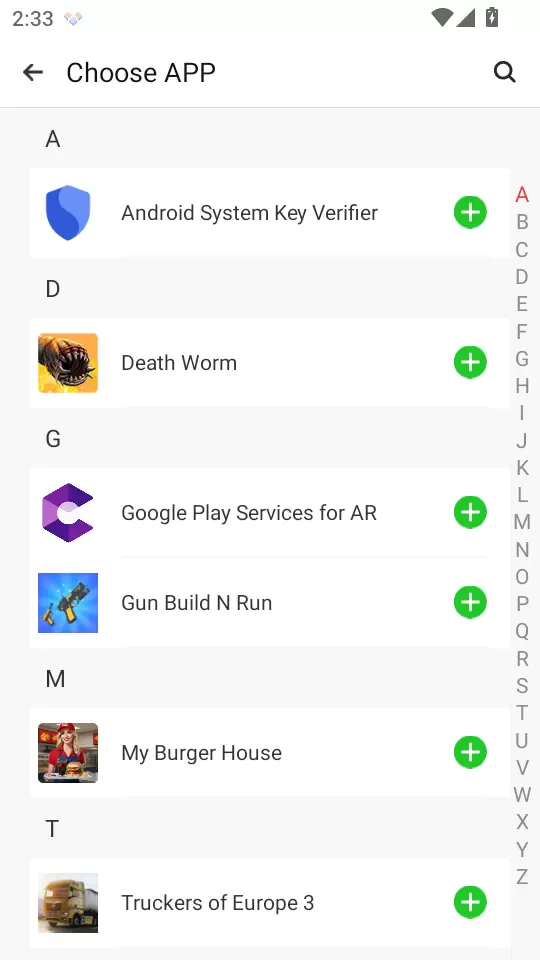
- **Add Apps to Clone**: Tap on the 'Add Apps' option to select the applications you wish to clone.
- **Create Clones**: After selecting, the app will duplicate these applications, allowing you to use multiple accounts.
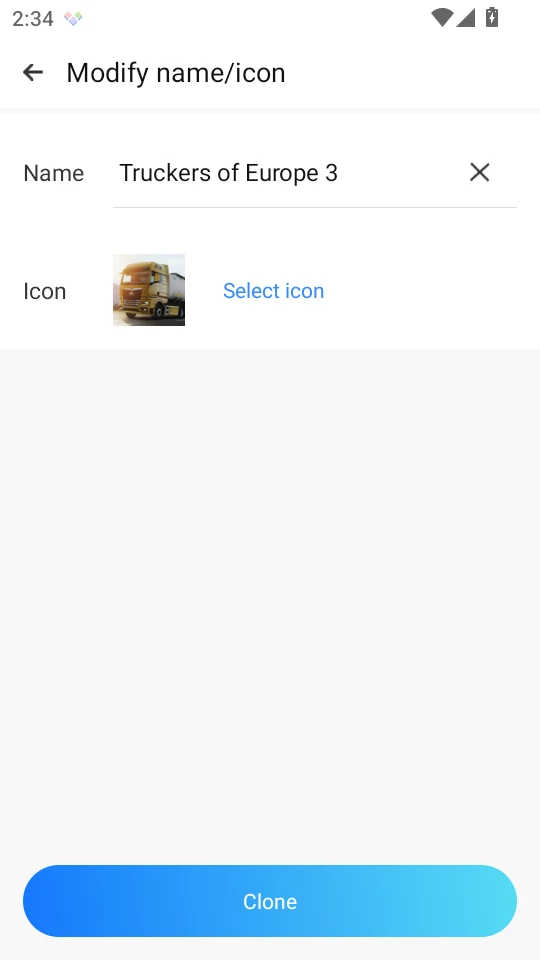
- **Customize Clones**: You can customize the cloned apps' icons and names for differentiation if needed.
- **Sign In**: Launch the cloned apps and sign in with different accounts.
- It’s a convenient tool for managing multiple social media or gaming accounts without the need to log out and in.
Clone App-Parallel Dual Space FAQs
How do I create a new app instance in Clone App?
To create a new app instance, open Clone App, select the app you want to clone, and tap on the '+' icon. Follow the prompts to set up the instance, then customize the name and preferences as needed.
Can I customize cloned apps in Clone App?
Yes, you can customize cloned apps by changing their icons, names, and settings. This allows you to differentiate between the original and the cloned version easily, enhancing your user experience.
How do I manage multiple accounts for an app within Clone App?
To manage multiple accounts, simply create separate instances for each account using the 'Clone' feature. You can switch between these instances without logging out, making account management efficient and straightforward.
What should I do if I want to delete a cloned app?
To delete a cloned app, open Clone App and locate the instance you wish to remove. Long-press on the app icon, then select 'Delete' from the menu. Confirm the deletion to free up space on your device.
How can I switch between multiple cloned apps?
Switching between cloned apps is simple. Follow these steps:
Open Clone App.
Tap the app instance you want to use.
Wait for it to load, and you will be redirected to the selected cloned app.
Repeat to switch to another instance as desired.








